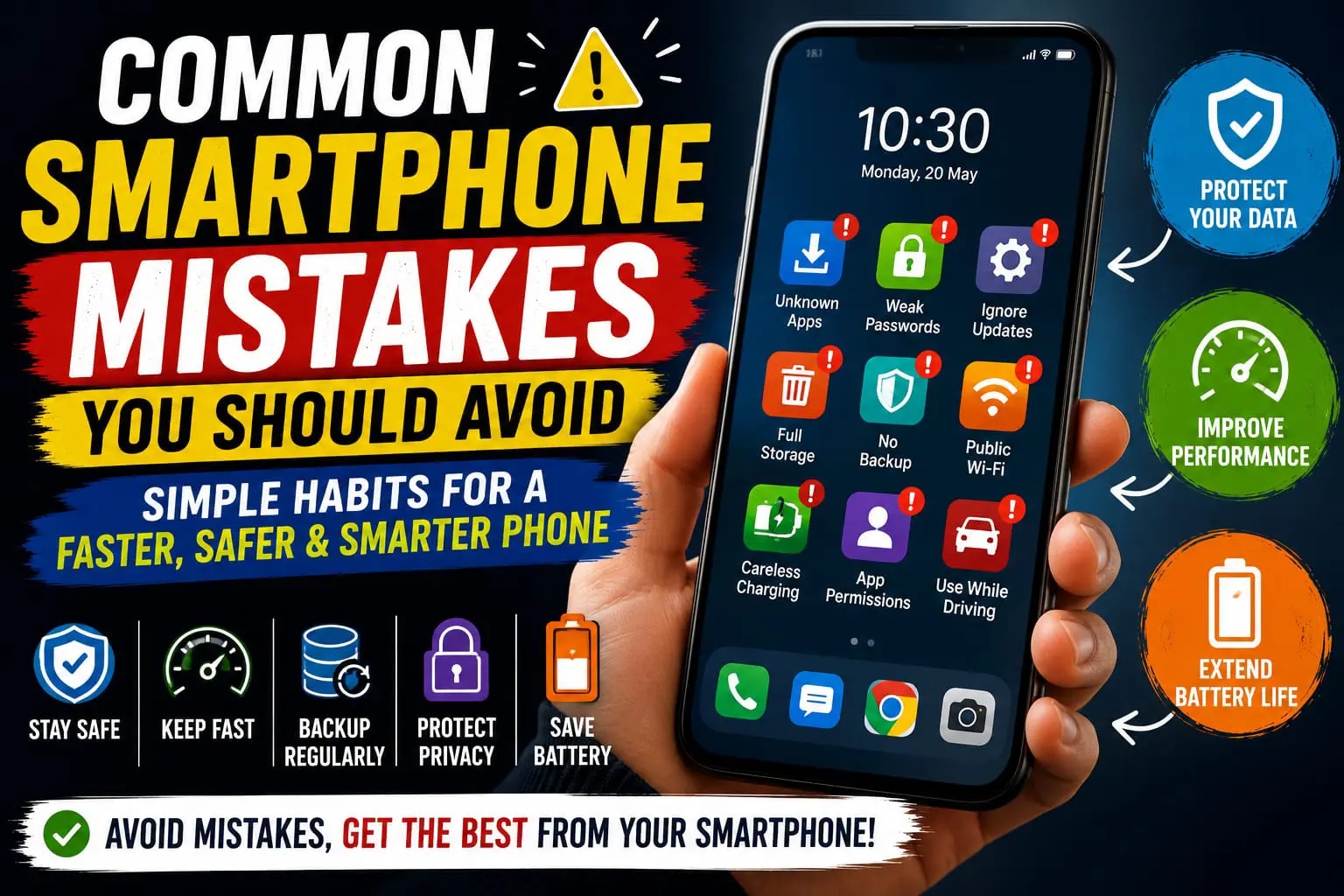
The Smartphone That’s the Workhorse in Our Pocket It’s the one thing nearly everyone has these days – the smartphone. We bank, shop, play, photograph, learn, and communicate from the devices we carry. Modern smart phones are certainly built for reliability and efficiency, yet the habits that some of us are unintentionally creating compromise the speed and battery life and compromise their security.
The best thing about all this is the fact that a lot of these issues can actually be avoided through small changes. You can improve the performance, secure your personal details and ultimately increase your handset life.
In this post, you will know most frequent smartphone mistakes that almost everyone has made it and also learn simple tips and tricks to avoid those mistakes.
1. Ignoring Software Updates
Software updates may bring essential security enhancements, fix errors, as well as introduce performance upgrades to your device. If you haven’t updated it for a while, it could be exposed to threats and may not function optimally.
Install official software updates from your device manufacturer or operating system developer whenever possible.
Benefits of Regular Updates
- Improves device security.
- Fixes software bugs.
- Enhances system stability.
- Adds new features and improvements.
2. Installing Apps from Unknown Sources
Downloading apps from unofficial websites or unknown sources can be a risk, as it could put malware onto your device. Make sure to stick to authorized sources like an app store whenever you can.
Check the ratings of an application, information about the developer, and requested permissions, before installing it.
3. Using Weak Passwords
A simple password will be all that they need to know to get into all of your personal information if your phone is lost or stolen. A good password or PIN- and biometric security if you can use it- is always best.
To enhance security further, you can also change your passwords often and avoid using the same password for different accounts.
4. Allowing Storage to Become Full
When you don’t have enough room on your smartphone, your device performance will deteriorate and can slow down. Remove redundant files such as older downloads, unneeded images, copies or outdated software from your device to maintain its productivity.
Organising your storage will make searching through them for specific information that bit easier too.
5. Charging Your Phone Carelessly
Charging your phone with low-quality chargers, as well as exposing it to high temperatures while charging, may result in battery damage in the long term. Use good and approved charging accessories for your mobile phone.
Also charging the phone in a cool, ventilated area keeps your phone battery performing.
6. Ignoring App Permissions
Lots of apps want access to your camera, mic, contacts, location, storage, etc. Some access needs are perfectly logical, others not so much.
Review App Permissions Frequently. Disable access to information that your apps don’t need, such as your location, camera, or photos. This simple practice will enhance your privacy.
Permissions to Review
- Location access.
- Camera permission.
- Microphone access.
- Contacts permission.
- Photo and storage access.
7. Connecting to Unsecured Public Wi-Fi
Although they are readily available in shops, hotels, airports and cafés, the use of free public Wi-Fi can lead to various security issues.
Never log in to confidential accounts, including banking and financial accounts, on unsecured public Wi-Fi. If you absolutely need to use a public network, confirm that it’s secure and use extra precaution.
8. Running Too Many Apps at the Same Time
Leaving lots of apps open at once can make your device seem slow – particularly if you have an older phone. Shutting down apps you aren’t using and restarting your phone every now and then can help keep things fast.
You also can use this regular uninstall of installed apps as an opportunity to take a look at all of the apps on your device and remove those that you seldom open.
9. Never Backing Up Important Data
Photos, videos, documents and contacts might also be on your smart phone. Should anything happen to your phone (lost, stolen, or a total failure), then everything could disappear if you do not have a backup system in place.
Trust another safe back up method or cloud based services such as google docs, Drop Box or iCloud. Let the backup occur automatically to relieve stress!
10. Using Your Phone While Driving
It’s easy to be tempted to text and drive, but it is really distracting and puts you and others at risk. Hands free (if allowed where you are) is not a substitute for paying attention to the road.
If your work permits you to park anywhere safely, do it to deal with calls or text communications.
11. Never Restarting Your Smartphone
For days people keep their phone ON without a restart! JustRestarting the device from time to time helps to reset the system processes, update few of the software settings and get rid of some minor software glitches.
Regular practice will boost overall efficiency and stability.
Simple Smartphone Maintenance Tips
- Restart your phone periodically.
- Remove unused apps.
- Keep your operating system updated.
- Back up important data regularly.
- Check battery health if your device supports it.
Common Smartphone Myths
Myth 1: Closing Every App Always Improves Battery Life
Nowadays, our smart phones come with quite advanced power management systems and should have no problems with background apps. So, force-closing apps every time won’t necessarily enhance battery power but rather consume power when apps are being launched.
Myth 2: You Must Charge Your Battery to 100% Every Time
If today’s modern phone battery you have does regular charging, you are fine with it. The charging cycle doesn’t really mean that you should wait until your battery dies fully or must be fully charged 100%.
Myth 3: More RAM Cleaner Apps Always Make Your Phone Faster
A number of devices currently handle memory efficiently; in these cases, an “installed-but-unneeded” app may have few advantages and will often eat up more resources.
Frequently Asked Questions
How often should I restart my smartphone?
Rebooting your phone every couple days, or once a week, could clear system processes and solve some small software issues. How often really comes down to how much you use the device.
Is it safe to install apps from unofficial websites?
The apps on some download sites also include many kinds of security risks. Only download the applications in the application stores that are released to the mobile phone in an official form, and download them to use, if it is possible to download.
How can I free up storage space?
You can Delete Apps you are not using, remove duplicate photos and videos, delete unwanted downloaded items, transfer useful files to safe cloud storage, or back them up to a backup safe place.
Why is my smartphone becoming slow?
There may be performance loss when there isn’t enough storage space available, when your computer’s operating system and applications are out of date, when there are too many apps and processes running in the background, when the hardware is old, or when apps require too much system memory and processing power. To improve overall performance, schedule and perform a maintenance routine.
Conclusion
Small, seemingly insignificant phone habits make a huge impact on your smartphone over the years. Here are a few easy to maintain habits: keep your smartphone up-to-date; manage your storage; monitor app permissions; prevent the misuse of personal data; and charge your phone safely.
Don’t wait for disaster strike to do basic upkeep. Dedicate a few minutes each month to software updates, organizing apps and files, and running checks of your security settings to help keep your phone working and safe for a long time.